Design

Making Context Free Art

If you are reading this post in your feed reader, you’ll want to click through to my actual website. Trust me on this one.

I was really impressed with Aza Raskin’s ContextFree.js experiment. I like how the simple rules of a context free art piece generate complex forms. See below, that text will turn into something I can’t exactly predict.
I’ve added a few comments to help you understand what’s going on there.

//all context free art starts with a single rule.  Ours will start with a rule named face.
startshape FACE
//and here is the rule FACE
rule FACE{
//a FACE rule means that we should draw the rules EYE MOUTH and HEAD.
 EYE{}
 // flip an eye over to the other side of the face.
 EYE{flip 90}
 MOUTH{}
 HEAD{}
}

//OH NO! We have two rules named HEAD.  Context free will randomly pick one
rule HEAD{ CIRCLE{}}
rule HEAD{  SQUARE{}}

rule EYE{CIRCLE { s .1 b .5 y .12 x .3}}
rule EYE {SQUARE { s .1 b .5 y .12 x .3}}
rule EYE {SQUARE { s .1 b .5 y .12 x .3 r 45}}
rule EYE {TRIANGLE { s .1 b .5 y .12 x .3}}
rule EYE {TRIANGLE { s .1 b .5 y .12 x .3 r 60}}

rule MOUTH {SQUARE{ s .8 .1 y -.12  b .5}}

And here is a randomly generated face, all made up of squares, circles, and triangles:

Want more faces? Go mess about with my face generator on Aza’s demo site.

update: in the comments Chris came up with a bunch of great mouths for an even better face generator!
The art is context free because any rule can be executed without knowing the context of the other rules - they are side-effect free. (these are the kind of problems that work well on lots of processors)
It gets much better. If you are using a modern browser, you’ll see that the heading of my website now is using this to generate random art up there in that previously wasted space.
Reload the website, you’ll see different art generated according to a handful of tiny algorithms. If you can see this, you might want to switch from Internet Explorer to Firefox or Safari. They both support the cool stuff that I’m doing, but you can’t see right now.

Art
Browsers
Design
Dev
Hacks
Pals
morelight

Comments (4)

Permalink

It’s all details

They say the devil is in the details. Sometimes subtle details are a place to shine.

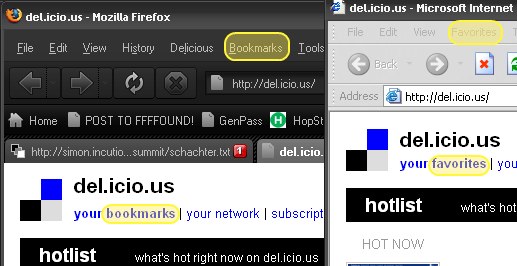
I was reading notes on a lecture by the great Joshua Schachter, developer of Del.icio.us, when I was thunderstruck by a detail.

You have to speak the user’s language. “Bookmarks” are what you call them if
you use Netscape of Firefox - most users these days know the term “favourite”
instead. Half of his population (? users) didn’t know what a bookmark was.

It is true:
The small details matter

Browsers
Design
Dev
User Experience

Comments (0)

Permalink

Offline and online

Google came out with a good idea a while ago called Google Gears.  The idea is to make some of these new fangled web applications able to function when you aren’t connected to the internet.

It never seemed like that great of an idea to me, but I’ve been using a personal Wiki to track household stuff with my pardner Sam.  I’ve been wishing for a wiki that I could use when I’m on the train and away from the internet.

I love the network.  When you are away from it though, why couldn’t you have a better cache - a mini net that is the last known version of what you seem to care about.  I’ve been using programs to download entire websites locally so I can read them while I commute.  It would be nice if you could just mark them as being of special interest in your browser.  Let computers hum and whir and keep it all up to date and in synch.  If we can do it with email, could we do it with the web, or at least the web I’m interested in?

Some folks think that offline and online will disappear as the network penetrates every corner of the world.  I doubt it.  Someone’s got to pay for it. More folks are interested in drinking water than BoingBoing, but it hasn’t penetrated every corner of the world.

Design
Dev
Get.rich.quick
Hacks

Comments (0)

Permalink

Interrobang

“You’re really going to start a band called interrobang” asked Tom excitedly.

Browsers
Design
Hacks
Lit
Pals

Comments (0)

Permalink

Get my Wallet for Free


If you like the wallet I posted about in November, good news.

I stumbled across an instructable about how to fold your own Tyvek Wallet.

It’s not as nice, but it’s also not as twenty bucks.

Design
Money
Pals

Comments (0)

Permalink

Design: Paradox of Choice

Here’s a simpler explanation of the usability design principle of avoiding choice.
Joel from Joel On Software just wrote a great and simple explanation of the Paradox of Choice.
It all centers on what is wrong with this picture. Why are there that many options to choose from when you want to shut down?

Every choice presented to you is something you have to evaluate. That evaluation takes time and brain power. Whenever possible, we should make the choices very very easy and few for the user. Things should “just work”.

It is true - the iPod, a battery powered device, doesn’t have an off switch. Why are there so many ways to shut down my computer? These choices require 3 separate clicks - Start -> Little Arrow -> Actual Choice.

Joel argues for reducing everything to a “B’Bye” button. One click and it prepares the computer for you being away. And it’s just that simple. The task is “I’m trying to leave my computer.” Therefore the design should not force the user to interact more with their computer!

I’d only complicate this by putting in a place in the control panel where you can configure this behavior if you care enough to do it.

As I write more on user experience, I’ll put these posts under the label “User Experience”. If that’s all you are interested in, you can go here for just user experience posts.

Design
Dev
User Experience

Comments (0)

Permalink

Design: Wallet

I got a new wallet. It’s made out of Tyvek, the stuff that FedEx pouches are made out of. It’s waterproof and unrippable. It’s also paper thin and light and I love it.
It looks like an Airmail envelope.

Full, it is smaller than my old leather wallet is.

Fits all the stuff I need, plus, I’ve added a tiny tiny little wallet pen so that I’m never without a pen. It’s already come in handy once.

That tiny silver thing in the middle is a wallet pen.
I love this wallet. It is beautiful and lovely and inspires me with how well designed it is.

Design
Pals

Comments (0)

Permalink

Concert: Marisa Monte

Tuesday night I went out with Nate and Claudia to go see Marisa Monte, a Brazilian singer-songwriter. I understood none of the songs, but it was very good music - chilled out stuff with lazy beats and happy melodies.

The staging was sparse but very effective. A few lightboxes, a platform, a few lights on movable booms and a spot. That was it, but it allowed for so many different moods.

Sometimes it suggested a warm homey room, sometimes a night out at 3 am when it’s just you and the moon, sometimes a city night under streetlights… I wish I had pictures that turned out well.

I was also pleasantly suprised that when I googled Marisa Monte, the first result was a link for more info on Google Music - what’s all this? Those guys keep indexing all of the world’s information in new ways!

Design
Music
Pals

Comments (0)

Permalink

UI Design

I’ve been assigned to do the User Interface design mock-ups for our settings by my boss because I’m the guy who gets all excited by well designed things and starts talking about user experiences and such. I’m the guy who reads Passionate Users, Infosthetics, Alex Barnett, Etc. I get hot for sparklines.

Most applications are capable of great things, but never get a workout from their users because they are difficult or scary to configure. It isn’t obvious to users how to do the things they want to do, so they just learn the minimum and stay with that.

Well designed things are easy joys to use. The best known thing like that right now is the iPod. People who don’t know technology are not afraid of the iPod because it works the way they expect it to. In the area that I work in, users are so involved in their business that they can’t afford to waste time learning the complexities of their applications. Things that are hard to understand just don’t get explored, the users call up the help desk and get someone to do it for them.

Every call like that is wasted money for users and for the development/support teams. The user isn’t doing their job and the developers aren’t doing their job.

My task is to make sure that our newest application will be iPod easy to use and configure, no small feat when you are doing a hell of a lot more than playing music.

In the beginning I was writing a little sample application that would be a sort of be a dummy with dummy data. Of course, I spent too much time digging into the programming and produced a close-to-working-shell with databinding to object collections. Too much for a mockup. To keep myself thinking about just the design I’m doing the rest as drawings to be implemented. We’ve got visio somewhere but it’s overkill for what I need. I got through just fine using the free web application Gliffy. It’s handy and fast, exports to JPG so I can stick it in our freshly minted wiki.

I’m writing up a user experience design guide for my team as well, most of which I’m getting from what I’ve read in Jensen Harris’s UI writings and Creating Passionate Users.

Design
Dev
Software
User Experience

Comments (0)

Permalink

Bad Behavior has blocked 205 access attempts in the last 7 days.