User Experience

It’s all details

They say the devil is in the details. Sometimes subtle details are a place to shine.

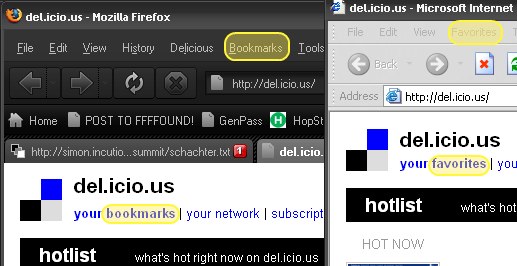
I was reading notes on a lecture by the great Joshua Schachter, developer of Del.icio.us, when I was thunderstruck by a detail.

You have to speak the user’s language. “Bookmarks” are what you call them if
you use Netscape of Firefox - most users these days know the term “favourite”
instead. Half of his population (? users) didn’t know what a bookmark was.

It is true:
The small details matter

Browsers
Design
Dev
User Experience

Comments (0)

Permalink

Making the switch to Ubuntu

Yesterday morning, the 7.10 version of Ubuntu was released. It’s supposed to be chock full of goodness, so my neighbor Lawyer Matt and I had an install party with Aaron and Ian.

I dug out an old IBM Thinkpad T20 laptop that had been lying around and we got to it. I’d tried various Linux installs before, including Ubuntu. It always got down to having to know far to much about the internals than I wanted to.

This was a huge difference. The basic install went very smooth. I hit one snag. This old laptop had a PCMCIA wifi card that wasn’t recognized. Aaron found the solution for my Linksys WPC54G on the Ubuntu forums. With that out of the way, it is working. I’m impressed by how simple and smooth the experience is so far. Of course, the experience so far is mainly checking gmail, playing a movie, and writing this post.

Linux
Software
User Experience

Comments (1)

Permalink

Turn Ads into Art with AddArt

What if fox news could just be more blatantAnother great idea from the folks at Eyebeam.  Take the idea of one of the most popular extensions for Firefox, AdBlock, but remix it to display art placeholders instead of blank space.

Instead of crappy banners, Fox news gets an eagle flying with an American Flag!

Now, this isn’t a final product - it’s still being worked on.  I’ve sent them a mail offering development help if they need it.  I love this idea.

Browsers
Hacks
Spam
User Experience

Comments (0)

Permalink

Alienware’s m5550 laptop: Vista Unready

There is an undocumented problem with their m5550 laptop. When the laptop goes to sleep - a feature that’s materially important to a modern laptop - wifi is disabled. When the laptop wakes up, the wifi doesn’t work. There is no way to bring it back but to reboot the laptop. Alienware’s position on this is that it is Microsoft’s problem, not theirs, and that there is no remedy available to you except to wait till Microsoft fixes the problem.

I was trying to do a nice thing for my partner Sam and buy her a new laptop. I got her an m5550 laptop from Alienware, and was excited to recieve it. When we discovered that the wifi doesn’t work on Alienware’s m5550 laptop, it was disappointing, but I was confident that we could find a patch or other solution. I went onto Alienware’s customer and tech support forums to find a solution. These forums are private, so potential customers can’t find them. This is the only place where Alienware admits the problem. I contacted Alienware tech support and they confirmed there is no technical solution to the problem. The earliest posting on it is from November 2006.

I’ve spoken with three different people from Alienware including Supervisor Kate. All confirm that Alienware’s position is that this is not their problem.

  • I bought the hardware from Alienware.
  • I bought the operating system from Alienware.
  • Alienware advertises the wifi card on the ordering page of their anti-wifi laptop.
  • Alienware doesn’t disclose the problem to potential customers.
  • Alienware’s promotional copy promotes their quality.

Also, from their promotional copy:

With every Alienware system, you are assured to receive components guaranteed to work optimally with each other, thus minimizing the possibility of technical issues and allowing you to start using your system immediately.

This sucks. I would like them to offer either a switch to XP, to take the laptop back without the 15% restocking fee, or to offer some other solution. Perhaps throw in a wifi PCMCIA card that they know works with the laptop and operating system?

Just about anything would be better than hearing that it isn’t Alienware’s problem and that I should just wait for a patch from Microsoft. They’ve known about the problem since November and it isn’t fair to treat their customers this way.

Please let your computer buying friend’s know about this problem and their response. I’d hate for other folks to be take for a ride…

Software
User Experience

Comments (0)

Permalink

Design: Paradox of Choice

Here’s a simpler explanation of the usability design principle of avoiding choice.
Joel from Joel On Software just wrote a great and simple explanation of the Paradox of Choice.
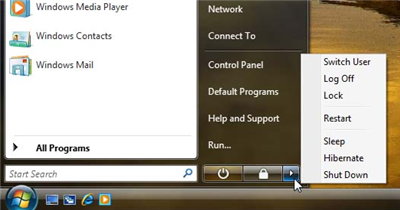
It all centers on what is wrong with this picture. Why are there that many options to choose from when you want to shut down?

Every choice presented to you is something you have to evaluate. That evaluation takes time and brain power. Whenever possible, we should make the choices very very easy and few for the user. Things should “just work”.

It is true - the iPod, a battery powered device, doesn’t have an off switch. Why are there so many ways to shut down my computer? These choices require 3 separate clicks - Start -> Little Arrow -> Actual Choice.

Joel argues for reducing everything to a “B’Bye” button. One click and it prepares the computer for you being away. And it’s just that simple. The task is “I’m trying to leave my computer.” Therefore the design should not force the user to interact more with their computer!

I’d only complicate this by putting in a place in the control panel where you can configure this behavior if you care enough to do it.

As I write more on user experience, I’ll put these posts under the label “User Experience”. If that’s all you are interested in, you can go here for just user experience posts.

Design
Dev
User Experience

Comments (0)

Permalink

User Experience Principles: Avoid Choice but Allow It

Just had a long user experience discussion with coworker Marc about concurrency problems in settings.
His argument:
Everything on a screen should be atomic.
My argument:
Concurrency should be resolved as often as possible without forcing the user to make a choice.
Alice opens up our settings application.
Bob opens up our settings application.
Alice changes the background color on the “Quantity” column in column view “Alpha” and then save it up to our server.
Bob reorders all of the columns in the Alpha column view to the order he thinks is appropriate for their group.
Bob saves the column view up to our server.

Marc argues that Bob’s settings should be rejected and he should reload in Alice’s settings, then redo his work and save up to our server.

I argue that Bob’s settings don’t conflict with Alice’s because column order is a property of a column view, not of the columns themselves in the column view. Caption is a property of the individual column.
Consider that column order has no meaning for an individual column outside of a column view collection - this is true no matter how you represent these entities in a database.
Bob doesn’t care about Alice’s caption change, and we should avoid bothering him about it.
If he’s changed the caption of the column as well, then we have a conflict. Bob should get notified that Alice made a conflicting change, we should tell him why it conflicts, and then he should get a choice to either abandon his change and accept hers or overwrite her change with his.

Bob wants to change the order of the columns in this column view. Alice wants to change the caption of a column in that column view.
Because what they want does not conflict, we should not get in the way of what they are trying to do. We should just get it done, and let Bob know that Alice has updated some settings.

Dev
User Experience

Comments (0)

Permalink

UI Design

I’ve been assigned to do the User Interface design mock-ups for our settings by my boss because I’m the guy who gets all excited by well designed things and starts talking about user experiences and such. I’m the guy who reads Passionate Users, Infosthetics, Alex Barnett, Etc. I get hot for sparklines.

Most applications are capable of great things, but never get a workout from their users because they are difficult or scary to configure. It isn’t obvious to users how to do the things they want to do, so they just learn the minimum and stay with that.

Well designed things are easy joys to use. The best known thing like that right now is the iPod. People who don’t know technology are not afraid of the iPod because it works the way they expect it to. In the area that I work in, users are so involved in their business that they can’t afford to waste time learning the complexities of their applications. Things that are hard to understand just don’t get explored, the users call up the help desk and get someone to do it for them.

Every call like that is wasted money for users and for the development/support teams. The user isn’t doing their job and the developers aren’t doing their job.

My task is to make sure that our newest application will be iPod easy to use and configure, no small feat when you are doing a hell of a lot more than playing music.

In the beginning I was writing a little sample application that would be a sort of be a dummy with dummy data. Of course, I spent too much time digging into the programming and produced a close-to-working-shell with databinding to object collections. Too much for a mockup. To keep myself thinking about just the design I’m doing the rest as drawings to be implemented. We’ve got visio somewhere but it’s overkill for what I need. I got through just fine using the free web application Gliffy. It’s handy and fast, exports to JPG so I can stick it in our freshly minted wiki.

I’m writing up a user experience design guide for my team as well, most of which I’m getting from what I’ve read in Jensen Harris’s UI writings and Creating Passionate Users.

Design
Dev
Software
User Experience

Comments (0)

Permalink

Bad Behavior has blocked 206 access attempts in the last 7 days.